Prerequisites
Ensure that you have already:
- Set up an environment variable
CRAGCROSS_DIR: see see here for instructions.. - Installed the original dictionary lists: see here for instructions..
Why might you need this application?
Several crosswords allow the frustrated solver to see one or more unsolved clues
on the same day that the crossword is made available online.
However, some, especially those offering prizes,
delay the viewing of solutions until the following week.
Personally, I have been frustrated,
when having finished 90% of a crossword,
I have had to wait for a week to find the missing two letters in a five-letter word.
This app allows the solver to supply a simple regular expresssion to find all of words that comply.
The intention of the app was to reduce frustation,
but obviously I cannot foresee if someone will use it to submit a prize solution.
Installation
Execute the following steps:
- Create a target folder,
WF, on your Windows Cragcross base directory; e.g.,C:\Cragcross\WF(used below). - Using the following link, save the attached
word_finder.7ztoC:\Cragcross\WF: Download word_finder.7z. - Double-click on
word_finder.7zword_finder.7z to expand. (If not the default action, right-click and select extract.)
Usage test
When word_finder.exe has been installed, execute the following steps:
- Double-click on
C:\Cragcross\WF\word_finder.exe - In the Regular expressions text box, type
BRID.E - Ensure that in the Dictionary radio buttons Reduced is checked.
- Press Find words
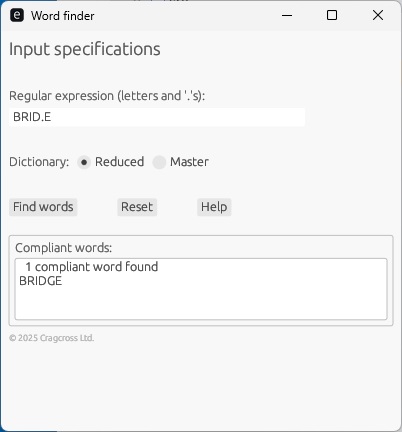
- You should see the following:
- Next, ensure that in the Dictionary radio buttons Master is checked.
- Press Find words
- This time, you should see the following:
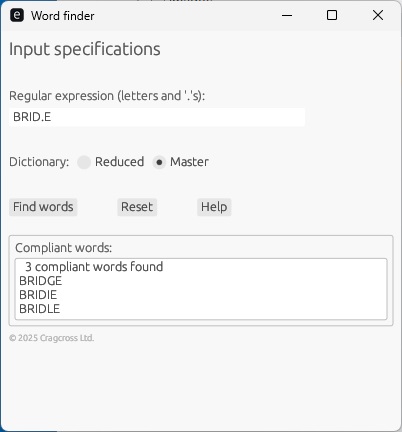
As you may have anticipated, when the larger word list, Master, is used, more compliant words are found.
It is anticipated that the word lists supplied may need to be updated, both for new terms that are coined, as well as to address words that were overlooked in the original lists. To so do, see instructions on how to update the dictionary lists.
Let me know of any problems you may encounter...